You changed the input variable. Why is the old one still there?
Add an input box in Captivate and it creates variables you can't rename or delete - we kept hitting that wall in our own courses. Authors have complained about variable cleanup since 2013. So we built a free tool that lists, renames and removes them, without your file ever leaving your browser.

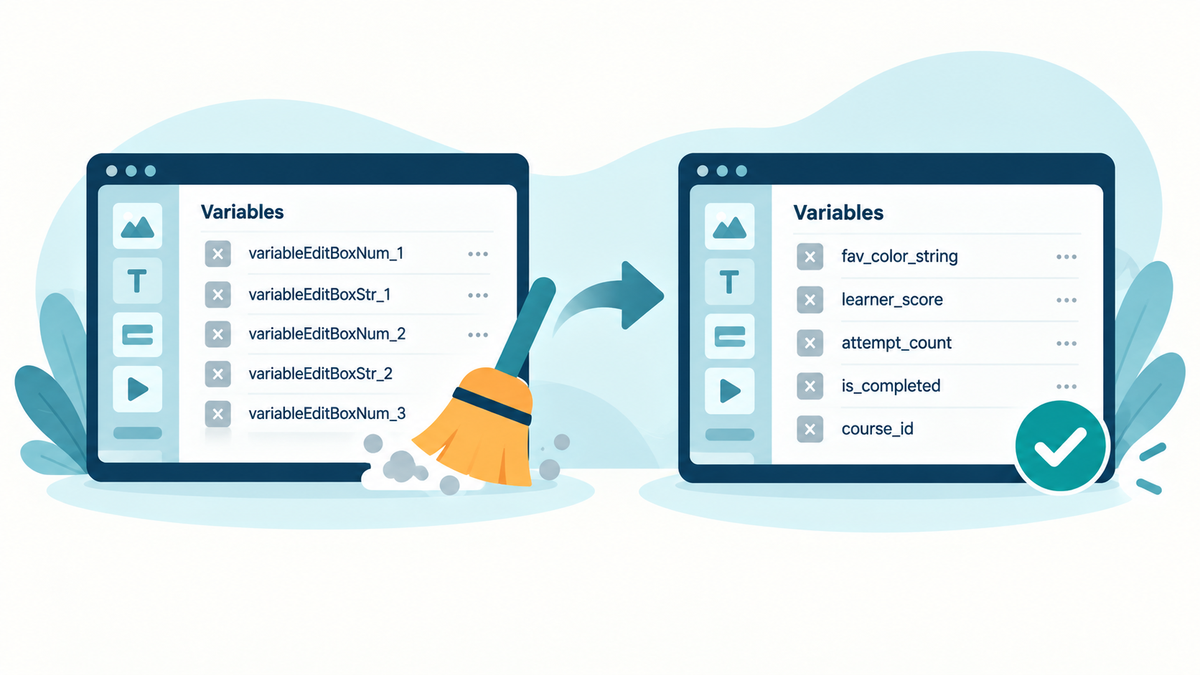
Add a Text Entry Box in Captivate and it creates two variables for you: variableEditBoxNum_1 and variableEditBoxStr_1. You want a name that means something, so you create fav_color_string and point the input at it. Done, right?
Not quite. The two generated variables stay in your list. Captivate won't let you rename them. It won't let you delete them. Repeat that across a course and the variable list fills with names you never chose and can't get rid of.
Twelve years of the same complaint
This is not a new irritation. Captivate authors have been reporting versions of it since 2013:
- 2013, Captivate 6: an author who removed every advanced action, slide object and library asset still got an in-use warning. "CPT prompts me that the variable is still in use; it's not." Their workaround: "living with a cluttered collection of unused variables."
- 2014: another author deleted their advanced and shared actions and still saw "Deleting variables used by advanced actions, shared actions and text objects is not allowed". As one responder put it: "you end up with unlinked variables cluttering up the project file and no way to get rid of them."
- 2014, Captivate 7: test variables outlived the actions that used them. "When I try to delete the associated variables, I am still asked to delete all references to the variable."
- 2018, Captivate 2017: renaming meant rebuilding every reference by hand. "You CAN rename Advanced Actions. It doesn't make sense that Variables cannot."
Fairness to Adobe: Captivate 8 added an Unused Items button back in 2014, and the current all-new Captivate does let you rename and delete user variables you created yourself. The blanket claim "Captivate can't delete variables" isn't true.
But the auto-created input variables are a different story. In our own Captivate 13 courses, the generated variableEditBox pair stays locked even after the input points at another variable. The cleanup problem moved. It didn't leave.
So we built the cleaner
Captivate Variable Cleaner is a free tool from our team that does the cleanup Captivate won't:
- See what your course uses. Every course variable, with the places that reference it: inputs, displayed text, interactions.
- Rename the generic ones.
variableEditBoxStr_1becomes a name that means something, with every reference updated. - Remove the leftovers. Delete variables you no longer need and download a cleaned copy of your course.
- Undo anything before you download.
It's free and there's no account. Drop in a .cpt file from Captivate 12 or later (up to 512 MB), clean up, download your copy. Your original is never touched.
Why you can trust it with your course file
Handing a project file to a web tool should make you nervous. Two straight answers.
Your file never leaves your browser. The cleaner parses and edits locally. We never see your course, its filename or its variable names. We use PostHog to count how the tool is used, and that's all.
It refuses edits it can't prove safe. A .cpt file is a ZIP around an undocumented binary object database, and variables are referenced by ID across inputs, actions, conditions and JavaScript. We mapped that database ourselves. Every rename or delete runs through reference checks first, and if the tool can't prove an edit is safe, it says no instead of gambling with your course. The engine's edits reproduce, byte for byte, files that have been through real Captivate open and save cycles.
The honest limits
- It works with
.cptfiles from Captivate 12 and later. Captivate Classic (.cptx) is not supported. - Some versions are still being tested. The tool tells you when that applies to your file.
- Captivate's built-in variables are shown, but stay locked. Captivate manages those.
- "No use found" means the cleaner didn't find a use it recognizes, not proof that none exists. Preview your downloaded course in Captivate before you publish it.
Try it
If your variable list is full of variableEditBoxNum_7 and friends, clean it up here. Free, no account, and your file stays on your machine.
And once the variables are sorted, get the rest of the course looked at. Review My eLearning collects feedback from your team and clients on the actual screens - start a free 14-day trial, no credit card required.