How to review a course built with Claude, Codex, or Lovable
AI builds the course in an afternoon. Then someone has to review it. Here is the workflow that keeps feedback on the screen and out of your inbox.


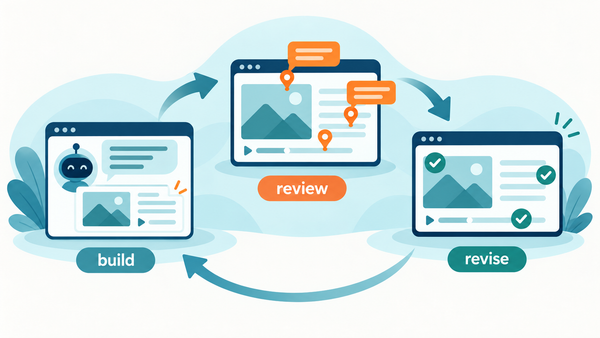
A course built with Claude, Codex, or Lovable in an afternoon still needs a human to sign off on it. More instructional designers are shipping client work this way - the generation works. The gap shows up right after: how do stakeholders review something that did not come out of Storyline or Rise?
There is no bundled review tool for a course built in a chat window. So feedback slides back to where it lived before review tools existed: email threads, screenshots in Word docs, and notes like "the screen with the forklift, the audio is off." Someone then spends a day translating that into a task list and guessing which screen each note refers to.
This is fixable with a workflow, not a new authoring tool. Here is the one we see working.
1. Get the course into a reviewable package
Review needs the real course, running properly - not a screen recording and not a PDF of slides. If your AI builder exports SCORM or HTML5, use that. If it hands you a folder of web files, zip it so there is a launchable HTML file at the root. Anything that runs in a browser can be reviewed as a course; a bare video file or a raw project file cannot.
2. Upload it where reviewers can reach it
Three doors, depending on how you work:
- Manual upload. Drag the package into your review tool. Fine for one course at a time.
- Through your AI assistant. If you use Claude or another MCP-capable assistant, it can push the course straight into Review My eLearning for you - "upload this course and set up a review" - without you touching a zip file. Setup takes one sign-in. (MCP setup docs)
- Through a pipeline. If courses come out of a build process, the Course Ingest API creates the course with one REST call and opens the first review cycle automatically. It is asynchronous - usually live inside a minute - so the honest word is fast, not instant.
3. Run an AI first pass before the humans
Before you spend SME attention, let a machine catch the boring stuff. AI Reviewers (in beta) sweep the course for accessibility problems, UX and navigation issues, and visual consistency, and drop their findings as ordinary comments on the exact screens. This is a first pass, not a substitute for your SME - it clears the floor so the human review starts on the things only a human can judge.
4. Put it in front of people, with zero friction
This is where most AI-built-course workflows actually break. The SME, the client, and the compliance reviewer all need to weigh in, and none of them should need a license, a login lesson, or a per-seat fee to leave a comment. Per-seat pricing on reviewers is how feedback ends up back in email.
The working setup:
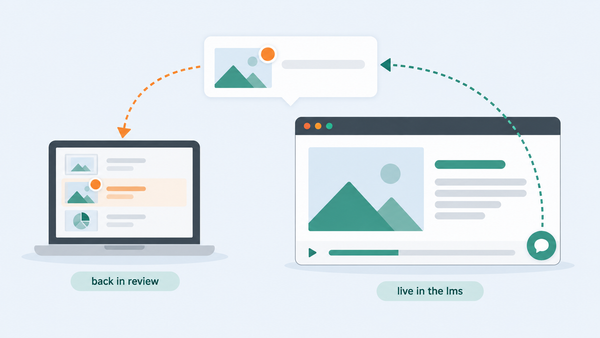
- Reviewers open one link and comment directly on the course as they go through it. Each comment lands on the screen they were looking at, automatically - no "slide 14, third bullet, maybe?"
- Reviewers are free and unlimited, so you invite everyone who needs to weigh in instead of rationing seats.
- Clients and external SMEs who should not have accounts at all get a public review link.
- Every comment carries a status, an assignee, and a thread - feedback becomes work someone owns and someone closes, and you can export the lot to a spreadsheet when a stakeholder insists on one.
5. Expect more versions, and keep the history
AI-built courses iterate fast - regeneration is cheap, so version two arrives the same afternoon. Re-upload, start a fresh review cycle with its own reviewers and settings, and keep version one's conversation attached to the course. Losing the history is how the same note gets made three times.
What to actually look for
The review itself is not different in kind from any other course review - content accuracy from the SME, accessibility, navigation, compliance sign-off - but AI-built courses fail in predictable places: confident-sounding content errors, inconsistent tone between screens, and interactions that look finished but break on the second click. Our QA checklist for AI-generated eLearning goes deeper on what to check.
This is not a hypothetical wave. Practitioners are already building client-facing courses with Codex and asking what pitfalls to expect, and people who have shipped courses built entirely with Claude are saying the result "could use more humans in the loop." And when Articulate shipped its own AI course generator this month, Dr Philippa Hardman put it through eight hands-on tests within a week and landed on the only question that matters: it can generate your course, but does it have instructional design expertise? That is the whole point: the AI builds it, your reviewers make it true, and the review layer is what keeps that fast instead of chaotic.
Whatever built your course, your reviewers can be commenting on it in minutes. Start a free 14-day trial - cancel any time before it ends - and send your first review link today.