How to review a course built with Claude, Codex, or Lovable
AI builds the course in an afternoon. Then someone has to review it. Here is the workflow that keeps feedback on the screen and out of your inbox.
Upload a .docx or .pptx storyboard and get thirteen scored judgments on the instructional design in under a second. Free, no account, nothing stored.
Articulate went all-in on AI at Articuland 2026. Whether or not that bet pays off, course production is getting cheap everywhere - and that makes human review the bottleneck.
The Invisible Tax on Instructional Design In most eLearning production cycles, there is a dead zone between the moment a storyboard is approved and the moment the first review link is generated. This phase isn't spent on instructional strategy or visual design. It is spent on the '
The shift from creator to editor AI has fundamentally changed the speed of course development. What used to take weeks of drafting now takes minutes of prompting. However, the speed of production often creates a bottleneck in the review cycle. When a course is built primarily by AI, the role
Beyond Decorative Filler In many eLearning projects, images are the last thing added and the first thing ignored during the review cycle. Developers often use stock photos as "wallpaper" to break up text, while reviewers frequently sign off on visuals as long as they aren't glaringly
The Review Trap Most eLearning review cycles fail because they start at the wrong end of the priority list. Stakeholders get bogged down in comma placement and brand colors while the underlying instructional logic is fundamentally broken. When you reach the end of a project and realize a branching scenario
The Failure of the Post-Course Survey Most eLearning feedback dies in a post-course survey. We ask learners to recall their experience after the fact, resulting in vague comments like "the navigation was confusing" or "some parts were too slow." For a developer or L&D
eLearning courses act as living systems where maintenance costs frequently exceed original development costs. Learn why courses 'rot' and how to prevent technical debt.
As an Adobe Captivate developer using JavaScript, debugging your project often requires checking the browser console for messages, warnings, or errors. However, if you're working in a production environment or using specific JavaScript code, you might notice that console.log and other console functions appear to do nothing.
The Storyline Course Inspector Chrome extension has received a significant update, bringing together powerful features and improvements to streamline eLearning development and QA processes for Articulate Storyline users. This update combines the functionality of two previously separate extensions, enhancing its capabilities and user experience. đź§© Get the Chrome Extension Key Updates
Have you ever wanted to enhance your eLearning courses with custom interactivity, but coding seemed like a roadblock? What if I told you that creating something impressive, like an interactive FAQ accordion for Articulate Storyline, could be done with just a few AI prompts and a sprinkle of JavaScript? In
One common challenge in Storyline development is randomizing the position of drag and drop objects. While Storyline has built-in randomization for question banks and quiz questions, there isn't a native way to randomize the position of drag and drop objects. This can be particularly challenging when dealing with
Anthropic just released something that's getting the AI community buzzing - their Computer Use API. I couldn't wait to take it for a spin, so I decided to try something ambitious: teaching Claude to evaluate an e-learning course. Here's what happened when I gave
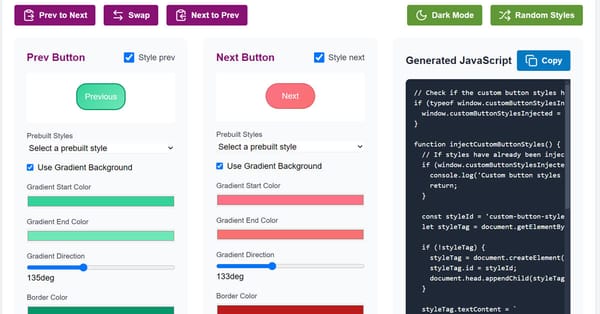
Creating visually appealing and interactive navigation buttons in Articulate Storyline can help engage your learners. Whether you're looking for custom styles, animated hover effects, or dynamic button behavior, adding these enhancements often requires time-consuming CSS and JavaScript work. But not anymore! With our Storyline Button Styler tool, you
features
As many of our subscribers know, earlier this year, we undertook a significant overhaul of the back-end of Review My eLearning. This decision was not made lightly. It involved extensive planning, resources, and a commitment to listening to your feedback. We are proud to say that this transformation was necessary
course development
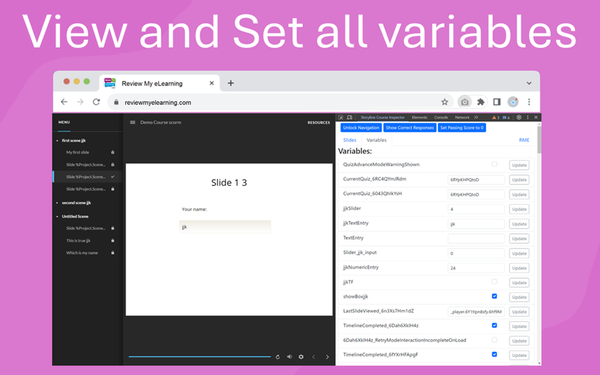
In today’s fast-paced world of eLearning, creating and maintaining high-quality courses efficiently is essential. For Storyline developers, inspecting and debugging courses can often become time-consuming and tricky, especially when managing variables, slide navigation, and quiz functionality. That’s why we built the Storyline Course Inspector—a Chrome DevTools extension
articles
In today's fast-paced business environment, project managers are constantly seeking ways to enhance efficiency, improve outcomes, and stay ahead of the competition. The advent of Generative AI offers a transformative opportunity to achieve these goals. According to the Project Management Institute's (PMI) paper, "First Movers&
course development
When working on Articulate Storyline courses, developers often need to implement custom JavaScript on specific slide objects. However, to do this effectively, you need to locate the [data-model-id] of the HTML element you want to target. In the past, this process has been cumbersome, requiring manual searches in the browser
If you're looking to add a touch of customization to your Rise course, one effective method is to insert CSS via a Storyline block. In this example, I’ll show you how to draw extra attention to the "Continue" button at the bottom of your lesson
Discover how to build an eLearning portfolio that showcases your expertise, attracts potential clients, and sets you apart in the competitive digital education market. Understanding the Importance of a Strong eLearning Portfolio In the dynamic world of eLearning, a robust portfolio is more than a display of completed courses; it&
Discover why an increasing number of educators are swapping traditional classrooms for digital platforms to become eLearning professionals. Exploring the Shift: Why Teachers Are Moving to eLearning The educational landscape is undergoing a significant transformation, with many teachers leaving traditional classrooms to embrace the world of eLearning. This shift is
Explore how human faces can transform the eLearning experience, enhancing engagement and retention. The Impact of Human Faces on Learner Engagement Human faces have an incredible power to capture attention and foster engagement. In eLearning environments, incorporating human faces in visuals can significantly enhance learner interaction. Faces are naturally engaging;
how to
Why Video Size Matters in eLearning Uploading large SCORM packages, like the one you're dealing with that's over 1GB, can cause significant issues for both you and your learners. Large files take longer to upload and download, which can be a frustrating experience. Additionally, these massive